Lessons · Lesson 2 of 5
One click, and three side effects
What the Confirm button commits, what it freezes without telling you, and the three writes the confirmation panel does not mention.
Lesson 2 of 5 · 22 min
What this lesson is about
Confirming an order looks like changing a word. A chip that said Draft now says Confirmed. In fact the click sets off three separate writes, and one of them freezes a standard that was live until that moment. This lesson is about all four things. Get it wrong and you argue with a buyer months later about which quality standard the order was placed against.
Everything below happens on ORD-1077 at Maritsa Outerwear, the order Rositsa Zhelyazkova created in lesson 1 for Vindelbo. It is 19 January 2027. Signe Aagaard has signed the order back, and Rositsa is about to press the button.
Five statuses, and the seven moves between them
An order has exactly five statuses. Not every pair of them is connected, and the map is smaller than people expect.
| From | May become | May not become |
|---|---|---|
| Draft | Confirmed, Cancelled | In production, Shipped |
| Confirmed | In production, Cancelled | Draft, Shipped |
| In production | Shipped, Cancelled | Draft, Confirmed |
| Shipped | nothing | anything |
| Cancelled | nothing | anything |
Seven moves in total, and every arrow points forward. There is no way back to Draft. Anything not in that table is refused by the server with a single line: That status change is not allowed.
Two of the seven have gates in front of them and are the subject of later lessons. Confirmed to In production is blocked until materials have been received. In production to Shipped is blocked until enough has actually been made. The move Rositsa is about to make, Draft to Confirmed, has no gate at all. Nothing checks whether the order is ready. That is deliberate, and lesson 3 is about what it means.
What the panel says
Rositsa presses Confirm order. A panel opens before anything is written, and it lists what is about to happen in three lines.
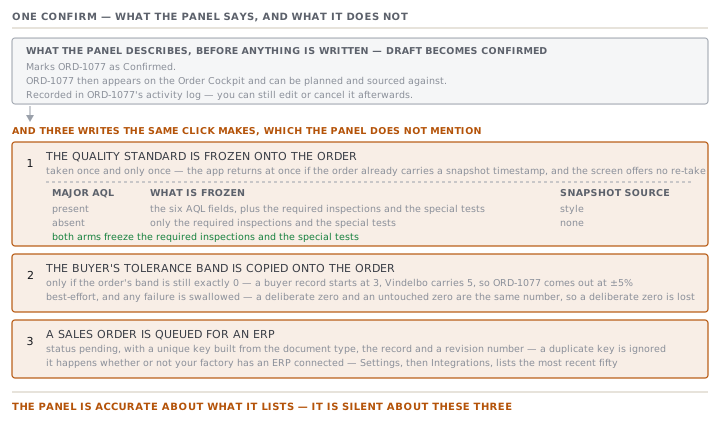
Marks ORD-1077 as Confirmed.
ORD-1077 then appears on the Order Cockpit and can be planned and sourced against.
Recorded in ORD-1077's activity log — you can still edit or cancel it afterwards.
That third line is true and it is worth reading twice. Confirming does not lock the order. Every field on it stays editable, which is the subject of lesson 4.
The panel is accurate about what it lists. It is silent about three other things the same click does.
Side effect one: the quality standard is frozen
The moment the status becomes Confirmed, the app copies the style's quality standard onto the order and stamps the copy with a date and time. From then on the order's inspections run against the copy, not against the style.
The AQL is the acceptable quality limit: the pass-or-fail rule an inspector applies to a sample drawn from the finished goods. Each level is the share of faulty pieces a lot may carry before the inspector rejects it, and a lower number is a stricter standard.
This matters because a style is a living record. Somebody may edit STY-266's Quality tab in March. The order placed in January must not quietly change the standard it was placed against, so it does not.
The copy is taken once and only once. Before writing, the app checks whether the order already carries a snapshot timestamp, and stops there if it does. There is no way to re-take it from the order screen.
Two things can happen at that moment, and which one you get depends on a single test: does the style carry a Major AQL level at all?
| The style has | What is frozen | Snapshot source | The line in the activity log |
|---|---|---|---|
| A Major AQL level | the six AQL fields, plus the required inspections and special tests | style | QA standard frozen from the style, naming the levels |
| No Major AQL level | only the required inspections and special tests | none | QA standard frozen — no buyer AQL set |
Both arms freeze the required inspections. That is the important half and it is easy to miss. A buyer can insist on a final AQL inspection and on metal detection without having a custom AQL standard at all, and those two obligations are frozen either way. They become hard blocks on shipping later, and lesson 5 of this course does not soften them.
The same three numbers, two different meanings
STY-266 carries Major 2.5, Minor 4.0, Critical 0, inspection level II. Those numbers reached the style from Vindelbo's buyer record, which carried them because a buyer starts life with the apparel standard already filled in.
Now suppose Rositsa had built STY-266 in a hurry and left the Quality tab blank. Her inspections would still run to Major 2.5, Minor 4.0, Critical 0, because those are also the labelled factory default the app falls back to when no real standard exists.
The resolved numbers are identical. What is not identical is where they came from. The resolved plan carries a flag saying whether this is a real buyer standard or the bare default, and a source saying where it came from.
| Major | Minor | Critical | Source | Is it really the buyer's? | |
|---|---|---|---|---|---|
| STY-266 as built | 2.5 | 4.0 | 0 | style | yes |
| STY-266 with a blank Quality tab | 2.5 | 4.0 | 0 | none | no |
Never quote the numbers to a buyer without checking which of those two rows you are in. The app knows the difference and says so honestly. A screenshot of the numbers does not.
Side effect two: the tolerance band arrives
The second write is small and has a sharp edge.
Every order carries a quantity tolerance band, a plus-or-minus percentage that decides later whether a short delivery counts as complete. A new order's band is 0, because that is the column default and nobody has been asked.
At confirm, the app looks at the buyer. If the order's band is still exactly 0, and only then, it copies the buyer's band onto the order and writes a line in the activity log saying it did. A buyer record starts life with a band of 3, the industry norm. Vindelbo negotiated wider, so their record carries 5, and ORD-1077 comes out of the confirm with a band of ±5%.
The whole copy is best-effort. It is wrapped so that any failure inside it is swallowed, on the stated principle that a tolerance hiccup must never block a confirm.
Side effect three: a document joins a queue
The third write leaves the order entirely.
A newly confirmed order queues one outbound document for an ERP, the accounting and inventory system some factories run alongside this one. The document is a sales order, on the reasoning that the factory is the maker and this is the sell side. The row lands in the outbound queue with the status pending and a unique key built from the document type, the record and a revision number.
Two things about this are worth knowing. It happens whether or not your factory has an ERP connected, so the queue fills up regardless. And the insert ignores a duplicate key, so nothing can queue the same document twice.
You can see the queue. It is on the Settings screen under Integrations, which lists the most recent fifty documents. If nobody at your factory has ever opened that screen, that is where those rows have been going.
Check yourselfAn order is confirmed on 19 January. On 4 March the merchandiser edits the style's Quality tab to raise the Major AQL from 2.5 to 1.5, because a different buyer demanded it. What standard does the January order's final inspection run against?Show the answer
Major 2.5, the one frozen at confirm. The snapshot was taken on 19 January and stamped, and the freeze check refuses to write over an order that already carries a timestamp. The order screen offers no way to re-take it. This is the behaviour you want: the standard the order was placed against is the standard it is judged by. It also means the style's Quality tab is not a reliable place to read what a live order is being inspected to. Read the order.
Prompt · Check an order before I press Confirm
In the minute before confirming an order, when the click cannot be undone.
Walk me through an order I am about to confirm, because confirming cannot be undone and it freezes things I may not have looked at.

I will paste, or describe: the order's buyer, style, quantity, ship date, line-feed date, price and currency; whether it has a colour and size breakdown; the style's quality tab, including whether a Major AQL level is set and which inspections the buyer requires; the buyer record's quantity tolerance band; and the order's own tolerance band right now.

Work through four checks in this order and give me a verdict on each.

One, the frozen standard. Tell me exactly which quality figures will be copied onto this order and stamped, and whether they are a real buyer standard or the labelled factory fallback. If the style has no Major AQL set, say plainly that the order will carry the fallback and that its numbers look identical to a real standard on a screenshot.

Two, the frozen obligations. List which inspections the buyer requires, and tell me which of them become hard blocks on shipping later. Say clearly that these freeze even when there is no custom AQL.

Three, the tolerance band. If the order's band is zero, tell me the buyer's band will overwrite it at confirm, and ask me whether that zero was deliberate. A deliberate zero is about to be lost.

Four, what confirming does not do. Remind me that it does not confirm the quantity, does not check readiness, and does not lock any field.

Then give me a short list of anything I should fix before pressing the button rather than after, and say why each one is harder to fix afterwards. Do not tell me the order looks fine unless you have actually checked all four.
AI can make mistakes — check anything you act on.
What to take away
- Five statuses, seven legal moves, all of them forward. There is no un-confirm.
- Draft to Confirmed is the only forward move with no gate in front of it. Nothing checks readiness.
- Confirm freezes the quality standard onto the order, once, permanently, and freezes the buyer's required inspections even when there is no custom AQL.
- Confirm copies the buyer's tolerance band, but only over a band of exactly zero, so a deliberate zero is lost. Check it afterwards.
- Confirm queues a sales order for an ERP whether or not you have one. Settings, then Integrations, is where those rows live.