Lessons · Lesson 4 of 5
What an amendment actually touches
Which fields an order will let you change after confirmation, which two locks decide that, and what a changed date or quantity re-opens downstream.
Lesson 4 of 5 · 24 min
What this lesson is about
Buyers change their minds. The order in the app has to change with them, and the change is never only the number you typed. Something downstream was built on that number and does not know it moved. This lesson is about what moves with it and what does not. Get it wrong and you cut to a plan nobody has worked out again, or you promise a date the materials cannot meet.
It is 17 March 2027. Signe Aagaard writes to Maritsa Outerwear with two changes to ORD-1077. Vindelbo wants the goods a fortnight earlier, on 20 April rather than 7 May. And the largest size is not selling, so the top of the range comes out.
Twenty-five fields, and two locks
The order detail page keeps a list of the columns a user may edit. It has twenty-five entries, and they fall into five kinds.
| Kind | How many | Examples |
|---|---|---|
| Optional dates | 11 | Deposit due, LC expiry, Ex-factory (actual), Delivered |
| Other parties' references | 6 | Buyer PO #, LC #, BL #, Destination country |
| Free text | 3 | Buyer, Style, Notes |
| One compulsory date | 1 | Ship date |
| One of each | 4 | Quantity, Agreed price per piece, Payment terms, Partial shipments |
Twelve of the twenty-five are dates, and only one of the twelve, the ship date, refuses to be cleared. Blank any of the other eleven and it goes back to absent rather than to some stand-in value. That is the same rule the whole app runs on: an empty box is a question nobody has answered. It is not a zero and it is not today.
Two separate locks decide whether you may touch any of them, and they are not the same lock.
| Lock | Covers | Trips when |
|---|---|---|
| The panel lock | breakdown grid, shipments, the T&A plan, the tolerance band, confirm quantity | the order is Shipped, Cancelled or archived — or your role has read-only access |
| The field lock | the inline fields on the Overview tab | the order is Cancelled — or your role has read-only access |
T&A is the Time and Action plan, the order's dated list of milestones.
Read the second row carefully, because the difference is deliberate. A shipped order's grid is locked and its Overview fields are not. That is right, and the reason is in the field list above. The BL number arrives after the goods sail. The delivered date arrives later still. The balance-received date can be weeks after that. An order that locked every field the moment it shipped would make half its own fields impossible to fill in.
The server agrees with the field lock and not with the panel lock. It refuses an edit on exactly two conditions, and their messages are these.
Cancelled orders cannot be edited.
This order is archived — Restore it to make changes.
The two date guards
Rositsa's first job is the ship date. Two rules stand between her and the change, and they are mirror images.
| You are editing | It is refused when | The message |
|---|---|---|
| Line-feed date | the new date is after the ship date | Line-feed date must be on or before the ship date. |
| Ship date | the new date is before the line-feed date | Ship date can't be before the line-feed date. |
ORD-1077's line feed is 26 March. The new ship date is 20 April, comfortably after it, so the edit is accepted. Rositsa gets a confirmation line with an Undo beside it:
Saved: 7 May 2027 → 20 Apr 2027
The same words go into the activity log as Ship date: 7 May 2027 → 20 Apr 2027, against her name and the moment she did it. Press Undo and a second row is written with (undo) on the end. The log records the correction rather than hiding it.
Now the mirror. Two days later Ognyan comes back from the fabric mill: the shell fabric has slipped and the cloth will not be in the building before 20 May. He tries to record it honestly by moving the line feed to 20 May, and the app refuses, because 20 May is after the ship date of 20 April.
What the quantity change actually goes through
The second half of the amendment is the quantity, and here the route matters more than the number.
The Overview tab has a quantity field. It is read-only whenever the order has a breakdown, which ORD-1077 does. So the change is made in the grid, and the grid is a different code path with different consequences.
| Colourway | Size | Was | Now |
|---|---|---|---|
| Bitumen | XXL | 240 | 60 |
| Rimefrost | XXL | 220 | removed |
| Order total | 8,000 | 7,600 |
Two cells, four hundred pieces. Rositsa saves and the log records Breakdown saved — 11 colour×size cells, total 7,600 pcs.
Now the part the email did not mention.
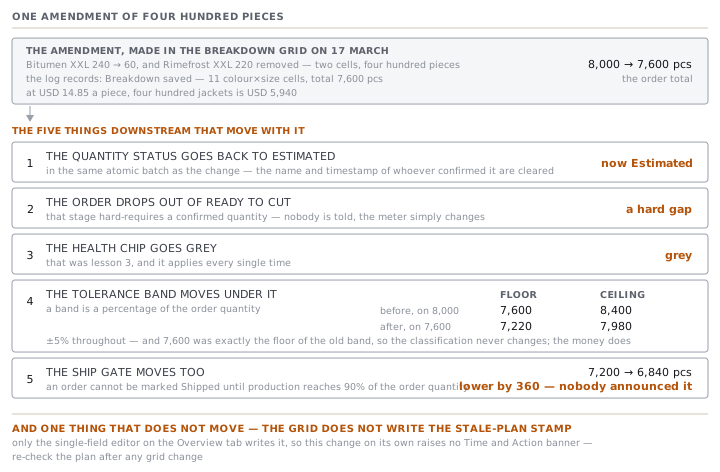
The quantity is provisional again. The grid save sets the quantity status back to estimated as part of the same atomic batch, so ORD-1077 drops out of Ready to cut and the health chip goes grey. That was lesson 3, and it applies every single time.
The tolerance band moves under it. ORD-1077 carries ±5%, copied from Vindelbo at confirm. A band is a percentage of the order quantity, so shrinking the order shrinks the window.
| Order quantity | Floor | Ceiling | |
|---|---|---|---|
| Before | 8,000 | 7,600 | 8,400 |
| After | 7,600 | 7,220 | 7,980 |
There is an accident in that table worth pausing on. The amended order quantity, 7,600, is exactly the floor of the old band. So a delivery of 7,600 jackets would have been classed Complete against the original order, and is dead centre of the amended one. The classification never changes. What changes is the money: at USD 14.85 a piece, four hundred jackets is USD 5,940.
The ship gate moves too. An order cannot be marked Shipped until production is substantially complete, and that means at or above 90% of the order quantity. Ninety per cent of 8,000 is 7,200 garments. Ninety per cent of 7,600 is 6,840. The amendment lowered the threshold by 360 pieces, and nobody announced it.
The stale-plan flag, and the path that does not raise it
The last consequence is the one with a wrinkle in it.
When a plan-affecting field changes on an order that is past Draft, the app stamps the order with the time of the change. The T&A tab compares that stamp against the newest milestone it holds. If the change is later, a banner appears. It says that the ship date, quantity or line-feed date changed on a named date, after these milestones were worked out, and it asks you to apply a template again.
Three fields raise the stamp, and only on an order that is no longer a Draft: ship date, quantity and line-feed date. A Draft order is still being set up, so amending it is free.
The stamp is written in exactly one place in the whole application: the single-field editor on the Overview tab. The breakdown grid does not write it.
So Rositsa's two changes, made ten minutes apart, behave differently.
| The change | Route | Stamps the order | T&A banner |
|---|---|---|---|
| Ship date, 7 May to 20 April | Overview field | yes | shown |
| Quantity, 8,000 to 7,600 | breakdown grid | no | not from this change |
On this order it does not bite, because the ship-date edit raised the banner anyway and applying the template again fixes both. On an order where only the quantity changes, it does. Re-check the T&A after any grid change rather than waiting to be told.
Applying a template again clears the banner properly, and for a reason worth knowing: the fresh milestones are written with a newer timestamp than the change, so the comparison stops being true. It is not a dismiss button.
Check yourselfA buyer cuts an order from 12,000 to 9,000 on the day production hits 8,100 pieces. Nobody re-confirms the quantity. What has changed about the order's ability to ship, and what has not?Show the answer
Its ability to ship has improved without anybody making anything. The ship gate needs 90% of the order quantity, so it fell from 10,800 pieces to 8,100, which is exactly what the floor has already made, so the production blocker clears on the spot. What has not changed is the readiness meter or the health chip: the grid save set the quantity back to estimated, so Ready to cut has a hard gap and the chip is grey with "quantity not confirmed". The order can now ship but cannot be called on track, which is the app being honest in both directions rather than inconsistent.
Prompt · Work out what a buyer's amendment really moves
The moment an amendment email arrives, before you type anything into the order.
A buyer has amended an order. Work out with me everything the amendment moves, not just the field they named.

I will paste, or describe: the buyer's amendment email; the order's current quantity, ship date, line-feed date, tolerance band and price; whether it has a colour and size breakdown; how many pieces the floor has already made; and whether the order carries a Time and Action plan.

Give me the answer in five sections.

One, the fields I actually have to change, and by which route. Say clearly whether a quantity change has to go through the breakdown grid, and warn me that saving the grid re-opens the quantity to estimated.

Two, the date guards. If the amendment moves the ship date earlier, check it against the line-feed date and tell me whether the app will refuse it. If it will, tell me which field to move first.

Three, the tolerance band. Recompute the floor and the ceiling from the new quantity and the band percentage, and show both numbers before and after. Tell me whether any delivery already booked or already made falls differently against the new band.

Four, the ship gate. Ninety per cent of the order quantity is the threshold for marking an order shipped. Give me the old threshold and the new one in pieces, and tell me whether the amendment has moved it above or below what the floor has already produced.

Five, the plan. Tell me whether the Time and Action plan needs re-applying, and warn me that a quantity change made through the grid does not raise the stale-plan banner.

Finish with one paragraph I could send back to the buyer confirming what we have understood, in their terms, with the new numbers in it. Do not agree to anything in it that I have not told you we agreed.
AI can make mistakes — check anything you act on.
What to take away
- Twenty-five fields are editable after confirmation. Twelve of them are dates, and eleven of those twelve can be cleared back to absent.
- Two different locks apply. The Overview fields lock only on Cancelled, so a shipped order can still take its BL number and its delivered date.
- The server refuses an edit on exactly two conditions, Cancelled and archived, and names both in plain words.
- A quantity change goes through the grid, which re-opens the quantity to estimated and does not raise the stale-plan banner.
- One amendment moves the tolerance band and the ship gate underneath you. Work out the new floor and the new 90% before you agree to it.