Lessons · Lesson 3 of 5
The second confirmation, and the colour grey
The difference between a confirmed order and a confirmed quantity, and why an order with every box filled in is still not green.
Lesson 3 of 5 · 24 min
What this lesson is about
The word confirmed is used twice in this app, for two different things. One is the order's status. The other is a flag on its quantity. They move independently and mean different things. This lesson is about both, and about a third thing that follows from them. An order can be confirmed, planned, priced and fully described, and still show a grey chip. That is not a bug and it is the most useful thing on the screen.
Everything happens on ORD-1077 at Maritsa Outerwear, for Vindelbo, which Rositsa Zhelyazkova confirmed in the last lesson.
Two things called confirmed
The order's status is one of five words, and it lives on the record's header. Rositsa moved it to Confirmed by pressing a button in lesson 2.
The quantity status is a separate field with two values, estimated and confirmed. It has its own chip on the Breakdown tab, amber for Estimated and green for Confirmed, and its own button. Confirming one does not confirm the other.
A new order's quantity status is estimated. Nothing about the order status changes that.
Rositsa presses Confirm quantity and gets a panel, the same shape as the status panel.
Confirms ORD-1077's quantity at 8,000 pcs (2 colours × 6 sizes).
Capacity and planning can rely on it as firm; a future "ready to cut" gate will require it confirmed.
You can still revise it later (that re-opens it to estimated). Recorded in ORD-1077's activity log with who confirmed.
When she commits, the app stamps her name and the time on the order and writes a log line. The chip on the Breakdown tab now shows Confirmed followed by her name and the timestamp.
There are exactly two things that can stop her. The order must not be closed or archived. And the quantity must be greater than zero, or the answer is Enter a quantity before confirming. Nothing else is checked. Confirming a quantity is an action the app deliberately keeps available. It is not a gate.
The grid, and what saving it undoes
The Breakdown tab is a matrix. Rows are the style's colourways, columns are its size scale. STY-266 runs on the alpha scale, which is six sizes, and it has two colourways.
| Colourway | XS | S | M | L | XL | XXL | Total |
|---|---|---|---|---|---|---|---|
| Bitumen | 240 | 720 | 1,200 | 1,120 | 640 | 240 | 4,160 |
| Rimefrost | 220 | 660 | 1,110 | 1,030 | 600 | 220 | 3,840 |
| Total | 460 | 1,380 | 2,310 | 2,150 | 1,240 | 460 | 8,000 |
Once any breakdown line exists, the order's total is the sum of the grid, and the quantity field on the Overview tab goes read-only. That is not a lock imposed by the status. It is the app refusing to let two numbers disagree.
An empty cell is empty. It is not zero, it is not carried, and it is not written. Only whole numbers greater than zero become rows.
Saving the grid does five things in a single atomic batch. All five land or none of them do.
- Every existing breakdown line for the order is deleted.
- The new lines are inserted, each colour matched to a real colourway on the style.
- The order's total quantity is updated to the sum, unless the grid is empty.
- The quantity status is set back to estimated, and the name and timestamp of whoever confirmed it are cleared.
- An activity row is written naming the number of cells and the new total.
Step four is the one that catches people. Touch the grid, in any way, and the quantity is provisional again. The confirmation is a statement about one particular set of numbers, so changing the numbers withdraws it. The activity row travels in the same batch as the change, which is why the log can never disagree with the order it describes.
What Ready to cut actually asks for
The order carries a readiness meter with three stages. Each stage lists what it needs, and each requirement is either hard or advisory.
| Stage | Requirement | Severity |
|---|---|---|
| Ready to plan | a buyer | hard |
| Ready to plan | a style linked | hard |
| Ready to plan | a ship date | hard |
| Ready to plan | a quantity | hard |
| Ready to plan | a line-feed date | advisory |
| Ready to cut | the quantity confirmed | hard |
| Ready to cut | a size and colour breakdown | hard |
| Ready to cut | the style developed | hard |
| Ready to cut | an approved PP sample | advisory |
| Ready to ship | production substantially complete | hard |
| Ready to ship | a shipment booked | hard |
| Ready to ship | a passed quality inspection | advisory |
A PP sample is the pre-production sample: the garment the buyer signs off before the line is allowed to start cutting.
Read the second block against the last section. Saving the breakdown grid sets the quantity back to estimated, and Ready to cut hard-requires it confirmed. So an amendment to the grid takes the order out of Ready to cut until somebody confirms the quantity again. Nobody is told. The meter simply changes.
"Production substantially complete" has a number behind it, and the number is 90%. On ORD-1077 at 8,000 pieces that is 7,200 garments. Remember it, because lesson 4 moves it.
Why the order still reads grey
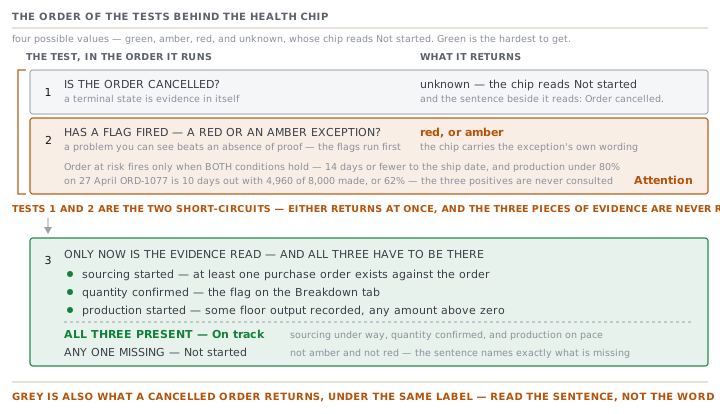
Now the third thing. The order's Overview opens with a coloured chip and a plain sentence. The chip has four possible values, and green is the hardest to get.
The rule is stated in the source in one line: green is earned, never assumed. The app will not call an order on track because nothing has gone wrong. It has to see three things actually happen.
- Sourcing started — at least one purchase order exists against the order.
- Quantity confirmed — the flag from earlier in this lesson.
- Production started — some floor output has been recorded, any amount above zero.
All three, and no red or amber exception, and the chip is green. Miss any of them and the verdict is not amber and not red. It is a fourth value, unknown, whose chip reads Not started and whose sentence names exactly what is missing.
Here is ORD-1077 as it actually moves, assuming nothing else is flagged.
| Purchase orders | Quantity | Produced | Verdict | The sentence beside the chip | |
|---|---|---|---|---|---|
| 19 Jan, just confirmed | none | estimated | 0 | Not started | no purchase orders raised, quantity not confirmed, no production recorded yet |
| 22 Jan, quantity confirmed | none | confirmed | 0 | Not started | no purchase orders raised, no production recorded yet |
| 2 Feb, Ognyan raises three POs | 3 | confirmed | 0 | Not started | no production recorded yet |
| 16 Mar, the line starts | 3 | confirmed | some | On track | sourcing under way, quantity confirmed, and production on pace |
| 27 Apr, ten days to ship | 3 | confirmed | 4,960 | Attention | ships in 10 days but production is only 62% |
Three of those five rows are grey, and none of them is a complaint. Grey is the app declining to reassure you about something it cannot see.
Grey means two different things
There is one rough edge here worth knowing about.
The verdict unknown is also what a cancelled order resolves to, with the sentence Order cancelled. The shared label for unknown is the phrase "Not started". So on any surface that prints the label on its own, a cancelled order and a never-started order look the same.
On the order's own Overview this does not bite, because the chip and the sentence sit side by side and the sentence is clear. Elsewhere, read the sentence rather than the label.
A flag always wins
The last row of the table is the one to study.
On 27 April, ORD-1077 has all three pieces of positive evidence. Three purchase orders exist. The quantity is confirmed. The floor has recorded 4,960 pieces. By the evidence rule the order should be green.
It is amber, because an exception has fired, and an exception is tested before the evidence is. The exception is called Order at risk and it has two conditions, both of which must hold: the order ships within 14 days, and production is below 80%.
| Value | Threshold | Fires? | |
|---|---|---|---|
| Days to ship date | 10 | 14 or fewer | yes |
| Produced | 4,960 of 8,000, or 62% | under 80% | yes |
Both true, so the amber fires and the health chip reads Attention with the exception's own wording underneath it. The three positives are all still there. They are simply not consulted, because the ladder tests the exceptions first.
That ordering is the right way round. A problem you can see always beats an absence of proof, and a green chip on an order that ships in ten days at 62% would be a lie however much evidence sat behind it.
Check yourselfAn order is fully confirmed, its quantity is confirmed, sourcing has three purchase orders and the floor has made 300 pieces. The merchandiser then fixes a typo in the breakdown grid, moving 40 pieces from L to XL. What does the health chip do?Show the answer
It goes from green to grey, reading Not started with the sentence "quantity not confirmed". Saving the grid sets the quantity status back to estimated as part of the same atomic batch, and the confirmed quantity is one of the three pieces of evidence green requires. Nothing has gone wrong, no work has been undone, and the order has not lost its purchase orders or its production. The app has simply stopped being able to say the quantity is firm, and it declines to keep reassuring you about a number somebody just changed. Confirming the quantity again puts it back.
Prompt · Explain a grey order, and tell me whether to worry
When an order that looks complete refuses to go green, and somebody is about to ask you why.
Explain to me why an order is showing a grey or amber chip rather than a green one, using the evidence rule rather than a guess.

I will paste, or describe: the order's status, its quantity and whether the quantity is confirmed, how many purchase orders exist against it, how many pieces the floor has recorded, how many days until its ship date, and any exception the app is showing on it.

Answer in four parts.

First, name the verdict the evidence gives. Green needs three positives, all present: at least one purchase order, the quantity confirmed, and some recorded output above zero. Tell me which of the three are present and which are missing, one line each.

Second, tell me whether a flag is firing. A red or an amber is tested before the evidence and beats it, so an order with all three positives can still read amber. If the amber is the ships-soon-and-under-produced one, show me the arithmetic: days to the ship date against fourteen, and the produced percentage against eighty.

Third, tell me plainly whether this is a problem. Grey with all the work still ahead of it is not a problem. Grey on an order that ships in three weeks is. Say which one I have.

Fourth, give me the shortest honest route to green, in order, and mark any step that would be dishonest. Confirming a quantity nobody has agreed is a dishonest route. So is raising a purchase order to make a chip change colour. Say so rather than listing them.

Do not tell me the order is fine because nothing is flagged. That is the exact reasoning the evidence rule exists to prevent.
AI can make mistakes — check anything you act on.
What to take away
- A Confirmed order and a confirmed quantity are two different flags. Confirming one does nothing to the other.
- Saving the breakdown grid always re-opens the quantity to estimated, in the same atomic batch as the change.
- Ready to cut hard-requires a confirmed quantity, so touching the grid takes the order out of that stage silently.
- Green needs three positives — a purchase order, a confirmed quantity, some recorded output — and no exception. Anything less is grey, not amber.
- Grey is also what a cancelled order returns, under a label that reads Not started. Read the sentence, not the label.