Lessons · Lesson 5 of 5
Two ways to stop an order
Cancelling against archiving, what each one refuses, and how the order confirmation the buyer receives is built.
Lesson 5 of 5 · 20 min
What this lesson is about
An order can be stopped in two ways. They are not interchangeable. One is a decision about the business. The other is a decision about your screen. This lesson is about telling them apart. It is also about the three cases where the app refuses to tidy an order away. And it is about the one document the buyer ever sees. Get it wrong and you hide work that other records still point at. Or you send a buyer a confirmation that no longer matches their order.
ORD-1077 is the order from the previous four lessons, amended down to 7,600 jackets for Vindelbo and now shipping on 20 April 2027.
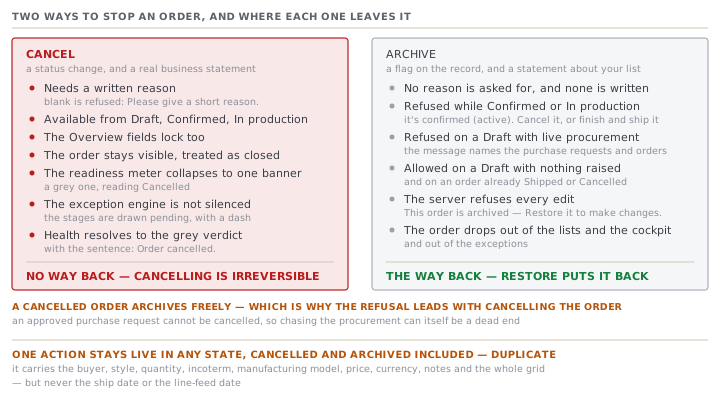
Cancel and archive are different decisions
They sit near each other on the screen and they do almost nothing in common.
| Cancel | Archive | |
|---|---|---|
| What it is | a status change | a flag on the record |
| Reversible | no | yes, with Restore |
| Needs a reason | yes, and the button refuses a blank one | no |
| Available from | Draft, Confirmed, In production | see the next section |
| Effect on edits | the Overview fields lock too | the server refuses every edit |
| Effect on lists | the order stays visible, treated as closed | the order drops out of the lists, the cockpit and the exceptions |
Cancelling is a real business statement, so the app makes you write one. The panel that opens says what will happen in three lines, and there is a required box underneath it.
Marks ORD-1077 as Cancelled.
Saves your reason in ORD-1077's activity log.
ORD-1077 stays visible but is treated as closed and can no longer be edited.
Leave the box empty and the answer is Please give a short reason. Fill it in and the log records the status it came from as well as the reason, in one line: Order cancelled (from Confirmed) — reason: Vindelbo withdrew the drop.
Archiving writes no reason and asks for none, because it is not a statement about the order. It is a statement about your list.
The three refusals on Archive
The app will not archive an order that other work still depends on. There are three cases, and each one names what is in the way rather than saying no.
| The order is | Refused | The reason given |
|---|---|---|
| Confirmed | yes | it's confirmed (active). Cancel it, or finish and ship it, before archiving. |
| In production | yes | it's in production (active). Cancel it, or finish and ship it, before archiving. |
| A Draft with live procurement | yes | it still has live procurement, naming the purchase requests and purchase orders |
| A Draft with nothing raised | no | — |
| Shipped or Cancelled | no | — |
The third row is the interesting one, and it exists because of a real incident. A Draft order with a submitted purchase request or an open purchase order against it was archived, the procurement was left with nothing to point at, and somebody ordered the same material twice. So the check now gathers the dependent records and names their codes in the message.
It also leads with the remedy that always works. An approved purchase request cannot be cancelled, so "go and cancel those" can itself be a dead end. Cancelling the order always works, and a cancelled order archives freely, so the message says that first.
What closed turns off
Three statuses count as closed: Shipped, Cancelled, and the Received that nothing can currently reach. An archived order is treated the same way.
A closed order's readiness meter does not compute. Instead of showing you Ready to cut on an order that already shipped, the whole meter collapses into one banner.
| Status | Banner | Tone |
|---|---|---|
| Shipped | Shipped — order complete | green |
| Received | Received | green |
| Cancelled | Cancelled | grey |
The exception engine goes quiet too, but only for one of them. A Shipped order produces no exceptions at all, because the builder returns an empty list before it tests anything. A cancelled order is not short-circuited there. Its stages are drawn as pending with a dash, and its health resolves to the grey verdict from lesson 3 with the sentence Order cancelled.
The one document the buyer sees
Everything else in this course is internal. The order confirmation is not.
It lives at the order's own address with confirmation/print on the end, and it prints on a clean sheet in both light and dark themes. The heading is ORDER CONFIRMATION, and immediately under the order number is a line that stops it being mistaken for something it is not: Proforma — for buyer confirmation, not a tax invoice. A proforma is a priced statement of what you intend to supply. It is not a demand for payment, and no tax authority treats it as one.
| On the page | Read from |
|---|---|
| The letterhead | your Factory profile in Settings |
| Issued | the date the order record was created, not today |
| Ship date, Status | the order |
| Buyer PO | the reference field from lesson 1, printed twice |
| L/C | the LC reference, shown only when set |
| Incoterm, Basis, Line feed | the order |
| The line table | the breakdown, grouped by colourway |
| Notes | the order's notes, shown only when set |
| Two signature lines | Confirmed by (Factory) and Accepted by (Buyer) |
The line table has one row per colourway, in the order the colourways were first seen in the breakdown, not alphabetically. Each row carries the size split as a single string. Sizes inside it are sorted against a fixed list of eleven names, from XXS up to 4XL, and anything not on that list falls to the end in alphabetical order.
Money is printed as the number followed by the currency code, so a unit price reads 14.85 USD rather than carrying a dollar sign.
Here is ORD-1077's confirmation as it would print on 18 March, after the amendment.
| Colourway | Quantity | Unit (USD) | Amount |
|---|---|---|---|
| Bitumen | 3,980 pcs | 14.85 | 59,103.00 |
| Rimefrost | 3,620 pcs | 14.85 | 53,757.00 |
| Total | 7,600 pcs | 112,860.00 |
Print the same document on 16 March, before the amendment, and it says 8,000 pieces and 118,800.00. No version is kept. The confirmation is built from the record every time it is opened, so it always shows the order as it stands now, under the same order number.
What the document will not invent
Two honest refusals are built into it, and they are worth knowing before somebody asks you why a column is full of dashes.
If the order has no agreed price, every amount on the document prints as a dash, and a line appears underneath saying no unit price is set yet and that setting the target price will value the proforma. It does not print zero, and it does not leave the column blank.
If the order has no breakdown, the table falls back to a single row labelled All, carrying the order's total and an empty size split. That is honest too: the app does not know the split, so it does not draw one.
The action that survives everything
One action stays live on an order in any state, including cancelled and archived: Duplicate.
It opens the create form filled in from this order: the buyer, the style, the quantity, the incoterm, the manufacturing model, the price, the currency, the notes, and the whole colour and size grid. Two things are deliberately left out.
The ship date and the line-feed date are not carried. The comment in the source gives the reason in one sentence: carrying old promise dates into a new order is exactly how wrong commitments happen. You have to type them again, and typing them again is the point.
Check yourselfA Draft order was raised in error. Sourcing had already submitted one purchase request against it before anybody noticed. The merchandiser tries to archive it and cannot. What is the shortest correct route to a tidy screen?Show the answer
Cancel the order first, with the reason written down, and then archive it. Archiving is refused because the Draft still has live procurement, and the message names the purchase request. Chasing the purchase request itself may not work, because an approved one is terminal and cannot be cancelled, which is exactly why the refusal message leads with cancelling the order instead. Once the order is Cancelled it is closed, the archive check passes, and it drops out of the lists. Cancelling is also the honest record: an order raised in error was cancelled, and the reason says so.
Prompt · Decide whether an order should be cancelled or archived
When an order has to come off the board and nobody is sure which button that is.
Help me decide whether an order should be cancelled, archived, both, or left alone.

I will paste, or describe: the order's status, whether it is already archived, what the buyer has actually said, whether any purchase requests or purchase orders exist against it and what state they are in, whether anything has been produced, and why somebody wants it off the screen.

Start by telling me which of these four the situation really is, and say it in one sentence. The buyer has withdrawn the order. The order was raised in error. The order is finished and I want a tidier list. Somebody dislikes seeing it and the work is still live.

Then apply the rules. Cancelling is a business statement, is irreversible, and needs a written reason that goes into the log. Archiving is reversible and only changes what appears in lists. An active order cannot be archived at all, and a draft order with live procurement cannot be archived until either the procurement or the order itself is closed.

Then give me the exact steps in order, and for each one tell me what it writes to the activity log. If the route involves cancelling first and archiving second, say so and say why that order and not the other.

Then draft the cancellation reason for me. One line, factual, naming who decided and on what date. It goes into a permanent log that somebody will read in an audit, so no blame and no adjectives.

Finally, tell me one thing I will lose by doing this that I might not have thought about. If the honest answer is nothing, say nothing rather than inventing a cost.
AI can make mistakes — check anything you act on.
What to take away
- Cancelling is a business decision, is irreversible, and demands a written reason. Archiving is a screen decision and reverses with Restore.
- An active order cannot be archived, and neither can a Draft that has live procurement. The message names the records in the way.
- Closed orders stop computing readiness and show a single banner instead. Only a Shipped order also silences the exception engine.
- The printed confirmation is built live from the record every time. Keep your own copy of the one you actually sent.
- With no price the amounts print as dashes, and with no breakdown the table prints one line called All. Neither is a zero.