Lessons · Lesson 4 of 5
Before a quote leaves the building
The four checks a quotation passes on its way from Draft to Sent, what the send does to your styles afterwards, why the approver sees a number bigger than any order this can become, and what the printable sheet still has on it.
Lesson 4 of 5 · 24 min
Sending is the moment it stops being a draft
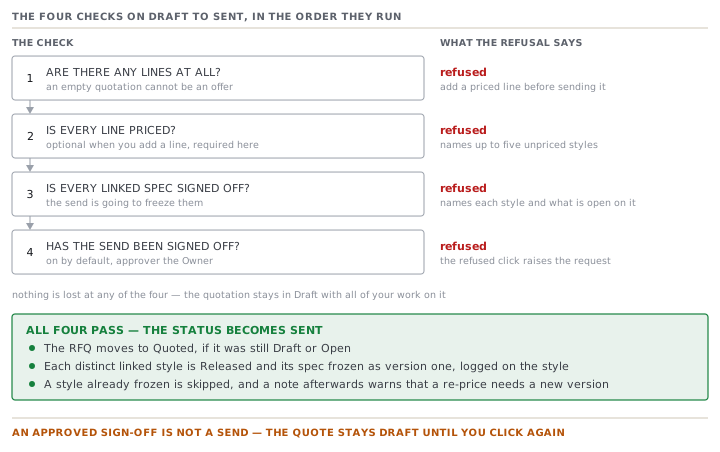
Up to now nothing has left the factory. Prices can be typed, changed and deleted, and nobody outside has seen them. Sending is the step that turns working numbers into an offer. The app treats it that way. Four things are checked before the status will move, and one thing happens to your styles afterwards that unsending will not undo. This lesson is about all five.
Palesa has quotation QUO-1061 Rev A open with four priced lines on it. She clicks Send to buyer. What happens next takes longer to describe than it does to run.
Every check, message and default on this page was read out of the app's own source code. Where a behaviour depends on a setting, the page names the setting. Where the screen in front of you disagrees with this page, the screen is right and the page is out of date.
The four lines she is sending
| Style | Band | Quoted price | Line value |
|---|---|---|---|
| Drover Chore Jacket | 1,500 | 22.90 | 34,350 |
| Drover Chore Jacket | 4,000 | 20.15 | 80,600 |
| Drover Chore Jacket | 9,000 | 18.35 | 165,150 |
| Ridgeline Canvas Vest | 6,000 | 11.70 | 70,200 |
| Total | 350,300 |
Hold on to that total. It matters at the fourth check, and it is not what anybody thinks it is.
Check one and check two: is there anything to send
The first check is that lines exist. An empty quotation is refused with "This quotation has no lines to quote yet — add a priced line before sending it."
The second is that every line carries a price. A quoted price is optional when you add a line, which is right. You build the shape of the reply before you have the number. It stops being optional here. The refusal counts the unpriced lines, names up to five of them as the style and the quantity, and ends "Price them or remove them before sending."
Nothing is lost in either case. The quotation stays exactly where it was, in Draft, with all your work on it. The refusal is a sentence, not a rollback.
Check three: the spec behind the price
This is the one people are not expecting, and it is the most important thing in the lesson.
Sending a quotation freezes the tech pack of every style on it. Not metaphorically. The send calls the same release the Styles screen calls. Each distinct linked style's specification is saved as version one, and its status moves to Released. From then on the spec is frozen, and changing it needs a new version.
The reasoning is that a firm price is a promise about a specific garment. If the spec can still drift after the buyer has your number, the number means nothing.
So the third check asks whether each of those specs is actually signed off. It reuses the style's own cross-function checklist rather than inventing a second rule, and it treats three cases differently.
- A line with no linked style is skipped. There is no spec to freeze.
- A style already frozen is skipped, and remembered for a note afterwards.
- A style not yet frozen is going to be frozen, so its signatures are checked.
An unsigned spec blocks the send. The message names each style and the signatures still open on it, and the styles are links straight to the checklist. Only an Owner can push past it, and the button says exactly what pushing past it costs: "Send anyway — freeze 2 specs unsigned (logged against you)". Anybody who is not an Owner sees a plain line instead, saying an Owner can send it anyway as a logged override.
QUO-1061 has four lines and two distinct styles, so two specs are in scope, not four. Palesa's jacket is signed. The vest is not, and the message names the signature still open on it. She goes and gets it rather than asking Nthabiseng to override. That takes an afternoon and costs nothing.
Check four: somebody else has to say yes
The last check is the sign-off. As the app arrives, every quotation send needs an explicit human approval, and the approver is the Owner.
That is a shipped default rather than a rule of the software. The flow is called "Send quotation to buyer". Its factory setting is enabled, approver Owner, with no amount threshold, and no threshold means always. It is edited at Settings → Sign-off rules, which is Owner-only, and the same screen governs cost sheets and purchase orders.
The mechanism is worth understanding because it surprises people the first time.
- Palesa clicks Send to buyer. The send is refused, and that refusal creates the approval request.
- She sees an amber note: "Sent for approval — the approver will see it on My Work and can approve or reject it on this page."
- Nthabiseng sees it on her own My Work, opens the quotation, and approves or rejects it in the panel at the top of the record.
- Palesa clicks Send to buyer again. This time it goes.
There is no self-approval shortcut. Nthabiseng clicking Send on her own quotation gets the same first refusal and the same pending request, which she then approves herself. Two clicks and a signature, by design, and the record carries who decided.
A rejection is not a dead end either. The note changes to say the send was rejected, points at the approver's note in the panel, and tells her to deal with it and ask for approval again.
The number the approver is shown
Now back to that total.
When the send reaches the approval gate it hands over an amount. The amount is every line's quoted price multiplied by its quantity band, added up. For QUO-1061 that is 350,300.
Sablewood is going to buy the jacket at one of its three bands. So the total counts the same jacket programme three times, at 280,100 of the 350,300. No order that can come out of this quotation will be worth what the approver is being shown.
| Reading | Value | Against the gate amount |
|---|---|---|
| The gate amount | 350,300 | — |
| Biggest possible order set: top jacket band plus the vest | 235,350 | the gate is 1.49 times it |
| Smallest possible order set: bottom jacket band plus the vest | 104,550 | the gate is 3.35 times it |
With the shipped default this changes nothing, because the default has no threshold and every send needs a signature whatever its size. It starts mattering the moment an Owner sets one. Put a threshold of a quarter of a million on this flow and it catches a quotation that can only ever produce a smaller order than that. It catches it because of the price breaks you offered, not because of the business at stake.
The rule underneath is honest about the other direction. When a threshold is set, approval is required only if the amount is known and at or above it. An unknown amount is never treated as over the line.
What happens the instant it goes
The status moves to Sent. Three other things happen without being asked.
- The RFQ moves to Quoted if it was still Draft or Open. Nobody types that.
- Each unfrozen linked style is released, its spec saved as version one, and a line is written on that style's own activity log naming the quote number and revision. Where an Owner overrode an unsigned spec, the log line ends with the override in words.
- If any style on the quote was already frozen, a note comes back after the send. It is worth reading rather than dismissing. The quote succeeded, and if you revised the spec in order to re-price, you needed a new version on the style first. Otherwise this new quote is riding the original snapshot.
A freeze that fails on one style does not roll back the send. The quote genuinely went to the buyer, so pretending otherwise would be the worse lie. The failure is reported and the other styles still freeze.
The document you print
The header carries a Print / PDF button, and it opens a clean quotation sheet. A title block gives the quote number and revision, the date, the validity date, the status and the currency. Under it sit a To-and-From pair and a table of Style, Quantity, MOQ, Lead time and Unit price. Then the terms, any notes, and two signature lines reading Prepared by · Date and Accepted by (Buyer) · Date.
Read the letterhead before you send it anywhere. The company name on it is the literal text [ Your Company Name ], and the line beneath it is [ Address line · City · Country ] · [ Phone ] · [ Email / Tax ID ]. The From block says the same thing again. These are placeholders in the page itself, not fields waiting to be filled in on a settings screen.
There is one more small inconsistency to know about on the way past. The RFQ's incoterm is a dropdown of the eleven Incoterms and nothing else. The quotation's own incoterm, on its Terms tab, is a free-text box with the placeholder e.g. FOB, CIF, DDP. The printed sheet shows the quotation's if it has one and falls back to the RFQ's if it does not. So a typo on the Terms tab is a typo on the buyer's document.
Check yourselfYour Owner approved the send yesterday. The buyer rang this morning to say they never got a quote. You look at the record and it reads Draft. What happened, and what is the single next click?Show the answer
Nothing went wrong and nothing is lost. An approval is permission to send, not a send. The quotation only moves to Sent when somebody clicks Send to buyer, and the record shows a banner saying exactly that. The single next click is Send to buyer, and this time it will pass the gate because the approval already stands. Then check the two things the send does behind it: the RFQ should now read Quoted, and each linked style should be Released with a line on its activity log naming this quote.
Prompt · Walk the four checks before I click send
On a Draft quotation that looks finished, and on any quote that was refused once already.
Play the part of the gate this quotation is about to hit, and refuse me before the software does.

I will describe the quotation: how many lines it has, whether every line carries a price, which styles are linked to those lines, whether each of those styles has a signed-off specification, whether any of them is already released and frozen, and what my workspace's sign-off rule for sending a quotation is.

Run the checks in this order and stop at the first failure, exactly as the app does. One, are there any lines. Two, is any line unpriced, and if so name them. Three, is any linked style's spec unsigned, and if so name the style and what is still open on it. Four, does the send need a human sign-off, and from whom.

At each step tell me plainly whether I pass, and if I do not, tell me the shortest honest route to passing. Distinguish between a route that fixes the problem and a route that overrides it, and say who is allowed to take the second one.

Then, separately, do two things. Add up every line's price multiplied by its quantity band and give me that total, and tell me how it compares with the largest single order this quotation could realistically produce. And warn me about the freeze: list which style specifications will be saved and locked the moment this send succeeds, and ask me whether any of them is one I still expect to change.
AI can make mistakes — check anything you act on.