Lessons · Lesson 3 of 5
The cost sheet is the join
Why a quoted line cannot exist without a cost sheet, what it inherits and what you type, which of the two records locks the other, and what the app tells you when the style has moved since you costed it.
Lesson 3 of 5 · 20 min
Every price has to come from somewhere
You can type a price into a lot of software and it will believe you. This one will not. A line on a quotation must name the cost sheet it came from before it can exist at all. That link is not a nicety. It is the only reason anybody can answer the question a buyer asks nine months later, which is how you arrived at that number. This lesson is about the link, and about what happens when its two ends drift apart.
Teboho has four sheets built. Palesa now has to turn them into a quotation Sablewood can read. She will type four prices, and she will type almost nothing else, because almost nothing else is hers to type.
Every field, message and rule on this page was read out of the app's own source code. Where the screen in front of you disagrees with this page, the screen is right and the page is out of date.
The one required field
The form that adds a line to a quotation has four inputs. Three are optional. The required one is not a style and not a quantity. It is a dropdown headed Cost sheet to quote from.
Each option in it reads as the style, the quantity band and the sheet's FOB price, in that order, with a dash where a sheet has no FOB yet. FOB is short for free on board, the price with the goods loaded on the ship at your port. Under the dropdown, a single line of hint text does the teaching: "Style and quantity come from the cost sheet. The price currency follows the sheet."
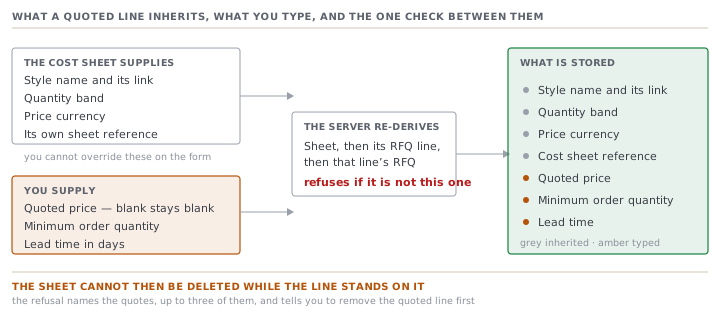
| On the quoted line | Where it comes from |
|---|---|
| Style name and style link | the cost sheet's RFQ line |
| Quantity band | the cost sheet |
| Price currency | the cost sheet's reporting currency |
| Cost sheet link | the dropdown you picked |
| Quoted price | you, optional, blank stays blank |
| MOQ | you, optional, in pieces |
| Lead time | you, optional, in days |
MOQ is the minimum order quantity, the smallest run you are willing to accept for that price.
Four of the seven are inherited and cannot be overridden on this form. The server works them out again rather than trusting the browser. It loads the sheet, walks back to the RFQ line the sheet belongs to, and checks that line belongs to this RFQ. If it does not, the refusal is "That cost sheet isn't part of this RFQ."
Two empty states cover the two ways a person arrives here early. With no sheets built, the panel says "Build a cost sheet first (Cost sheets tab) — a quoted line is priced from one." With sheets but no lines, it says "No quoted lines yet. Add one per style and quantity band below — each is priced from a cost sheet." Both name the next click.
Draft and Final, and what Final does not do
A cost sheet carries a status with two values. On the RFQ's Cost sheets tab it is a coloured dot reading Draft in amber or Final in green. In the editor it is a dropdown, and the two options are labelled Draft (still costing) and Final (ready to quote).
The label says ready to quote, and this is where a reasonable assumption goes wrong. Nothing stops you quoting from a Draft sheet. The action that adds a quoted line checks that the sheet exists and that it belongs to this RFQ. It does not look at the status at all.
Final is real, and it does three other things.
- Getting there is gated twice. A sheet that cannot be priced, or that the engine says is missing named inputs, is refused. Your edits are kept as a Draft while the gaps are listed, up to six of them by name. Past that, marking a sheet Final needs an explicit human sign-off, which is on by default with the Owner as approver.
- Refresh from style refuses on a Final sheet: "This sheet is Final — re-open it as a draft before refreshing."
- Re-cost to target refuses too: "This sheet is Final (sent) — start a new revision to re-cost."
So Final is best read as a claim you have made about your own work, backed by a completeness check and somebody's signature. It is not a lock the quotation respects. The discipline is yours.
Which record locks which
The link runs one way when a line is created and the other way when a sheet is deleted.
A quoted line cannot be created without a sheet. And once the line exists, the sheet cannot be deleted. Trying it is refused with a message that names the quotes standing on it, up to three of them, each as its number and revision. Then it names the way out: remove that quoted line first, then delete the sheet.
The reason is written into the code beside the rule. The column holding the sheet reference cannot be empty by design, so deleting a referenced sheet would leave a quoted line pointing at nothing. That fault would surface only in validation, long after anybody could explain it. The refusal is the cheaper outcome.
Sheets are versioned rather than overwritten. Each save bumps the version, and the version shows on the sheet's own header and on the RFQ's context rail as v1, v2 and so on. Palesa's jacket sheet at 9,000 is on its third save by the time she quotes from it.
When the style moves under the sheet
A cost sheet is a photograph of a style on a particular afternoon. Styles keep changing. The app watches for exactly that and puts the result in one place on the sheet's own page, in a panel headed This quote vs. the style today.
Five different things can appear in that panel.
- No style linked. A name-only RFQ line can still be costed, and the note says there is no tech pack behind it to pull from or check against.
- A component that cannot be priced yet, named, with the specific gaps listed.
- A consumption figure that is a rough estimate from the measurements rather than a confirmed number on the bill of materials. The note ends with an instruction: confirm it before sending the quote.
- The style changed after this sheet was costed. The note gives both dates.
- Numbers that cannot be right, or that differ from the style's own standard cost.
The staleness test is narrower than it sounds, and the narrowness is the point. It compares one timestamp on the style against the sheet's last save. That timestamp moves when the costing data moves: the bill of materials, the measurements, the consumption. It does not move when somebody edits the style's name, season or status. A sheet with no style linked is never stale, because there is nothing to compare it with.
| Date | What changed on the style | Sheet reads |
|---|---|---|
| 2027-02-15 | the lining swapped on the bill of materials | stale, and the panel names both dates |
| 2027-02-16 | the style renamed for the buyer's catalogue | unchanged |
| 2027-02-16 | the season moved from Autumn to Winter | unchanged |
Nothing about the amber panel blocks anything. It does not stop you quoting, sending or accepting. It is the app telling you what it knows, on the screen where you can still do something about it.
The other way in
Cost sheets have a second front door. The sidebar entry Cost sheets under the Quote heading opens a flat index of every sheet across every RFQ, with the style, quantity band, ex-factory price, FOB price, margin and status. Each row links back to the same editor.
Two things about that index are worth knowing. It is the findable way to answer what have we priced this style at before, which the RFQ-by-RFQ view cannot. And it sits in the sourcing role's module list while /quotations does not, so a sourcing colleague can reach the index and may not reach the sheet behind a row.
The sheet's own page carries a second back link for the same reason, reading ← Back to the style. A cost sheet genuinely belongs to two records at once, and people arrive from both.
Check yourselfYou mark a cost sheet Final, and the buyer then asks for a price at a quantity you have not costed. Your colleague suggests editing the Final sheet's quantity rather than building a second one. What breaks?Show the answer
The link, and quietly. The quantity band on a quoted line is inherited from its sheet at the moment the line is created. So an existing quoted line keeps the number it was born with, while the sheet underneath it now says something else. You would also have to get past two refusals to edit it usefully, since Refresh from style and Re-cost to target both decline on a Final sheet and tell you to re-open it as a draft. The intended move is a second sheet at the new band. A sheet is built per style line per quantity, and the Cost sheets tab offers a build button for every band on the line for exactly that reason.
Prompt · Check every price I am about to quote against its own sheet
Before a quotation goes for sign-off, and again if it sat in Draft for more than a fortnight.
Help me audit the link between each price I am about to quote and the cost sheet it is supposed to have come from.

I will give you, per quoted line: the style, the quantity band, the price I intend to quote, the linked cost sheet's ex-factory and FOB prices, the sheet's status, the date the sheet was last saved, and the date the style's bill of materials or measurements last changed if I know it. I will also give you the buyer's target price for that style if there is one.

For each line, work out and show me four things. The gap between my quoted price and the sheet's FOB price, in money and as a percentage of that FOB price. Whether the style changed after the sheet was costed, and if so how many days of drift there are. Whether the sheet is Draft or Final, and what that does and does not guarantee. And whether my quoted price is above or below the buyer's target, in money.

Then rank the lines by how uncomfortable I should be, worst first, and say in one sentence why each one is where it is.

Three rules. Do not tell me a price is fine because it is above the FOB price. Tell me by how much and let me judge. Where I have given you no date for the style's last change, write UNKNOWN rather than assuming the sheet is current. And if any line's quoted price is below its sheet's FOB price, put it at the top and say plainly that quoting it is a deliberate decision somebody should be making on purpose.
AI can make mistakes — check anything you act on.