Lessons · Lesson 5 of 5
Revisions, validity and the two endings
What a new revision carries and what it deliberately drops, why a quote can read Sent and Expired at once, what the award does to an order, and the one condition an enquiry has to meet before the app will call it won.
Lesson 5 of 5 · 20 min
Most enquiries do not end cleanly
A quote goes out. Sometimes it comes back with a counter-offer. Sometimes it goes quiet. Sometimes the buyer takes one line of four and never mentions the rest. This lesson is about all three endings. It is also about the number at the top of the list screen that claims to sum them up. One short rule produces that number. Knowing the rule is the difference between a figure you can defend and one you cannot.
Dara has QUO-1061 in front of her and she wants a better price at four thousand. Palesa has three moves available, and the interesting one is not the obvious one.
Every button, message, default and formula on this page was read out of the app's own source code. Where the screen in front of you disagrees with this page, the screen is right and the page is out of date.
Revising, and what a revision is not
A New revision button sits in the quotation's header, and it appears only once the quote has left Draft. A Draft is still yours, so you edit it in place. Anything the buyer has seen gets a new revision instead.
Clicking it mints the next letter and copies the offer across. Revisions run A, B, C and on through the alphabet.
| Carried forward | Deliberately dropped |
|---|---|
| Incoterm | Validity date |
| Currency | Notes to buyer |
| Payment terms | |
| Every quoted line, with its price, MOQ and lead time | |
| A fresh Draft copy of each line's cost sheet |
Two of those deserve a sentence each.
The validity date is dropped on purpose, and the code says why beside the line. A revision is a fresh offer, and the previous revision's validity may already have passed. Carrying it forward would print an expired date on a new document. The notes go for the same reason. An offer note written for the last round is not the note for this one.
The cost sheets are copied, not shared. Every line on the new revision points at a brand-new Draft duplicate of the sheet it came from, at version one. That is what lets you re-cost Rev B freely even though Rev A's sheet may be Final and refusing to be touched. It also means the two revisions cannot contaminate each other, which is the whole point of a revision.
One thing to expect that surprises people: the quote number changes too. Rev B is not QUO-1061 wearing a different letter. It is a new quotation record with its own number, so the pair reads QUO-1061 Rev A and QUO-1062 Rev B. Rev A stays exactly as it was sent, which is what you want when somebody asks in August what you actually offered in February.
The new revision starts in Draft, which means sending it runs all four checks from the previous lesson again, including a fresh sign-off request against the new record.
Two different kinds of expired
Palesa set QUO-1061 valid until 12 March 2027. Two separate mechanisms now watch that date, and they are easy to confuse because they use the same word.
The first is a chip in the record's header, worked out from the date every time the page loads. It has four possible readings and shows only two of them.
| Valid until | State | Shown |
|---|---|---|
| not set | none | nothing at all |
| 2027-03-13 | valid | nothing at all |
| 2027-03-12 | approaching | amber, expiry approaching |
| 2027-03-04 | expired | red, quote expired |
The window is a week, so the chip turns amber on 5 March for a quote valid until the 12th, and red on the 13th.
The second is the status, and the status is a human decision. Mark expired is a button somebody clicks. Nothing in the app moves a quotation to Expired on its own. So a quotation can perfectly well read Sent while carrying a red quote expired chip beside it, and both are correct. The date has passed. Nobody has said so on the record.
Expired is not a dead end. The one move out of it is back to Sent, which is the app's way of saying that reviving an old offer is a decision, not an accident.
The chase items on My Work read the date rather than the status, which is the right way round. A quotation that is Sent or Negotiating and carries a validity date produces "Quote expiring" in amber within the week and "Quote expired — no decision" in red after it. Both land you on the quote's own lines tab.
Accepting, and the button that only then appears
Dara comes back and takes the jacket at six thousand and the vest at four thousand five hundred. Palesa clicks Mark accepted.
Accepted is the end of the road for the quotation's status. There is nowhere to go from it. What it unlocks is a green Award → order button on each quoted line, and a banner in the header explaining that the header itself cannot award, because you have to choose which line.
The award panel shows three things worth reading before you confirm.
- A re-cost check: the quoted price, the linked cost sheet's FOB price as it stands today, and the gap between them, labelled Headroom vs cost. A negative gap turns red with its own warning.
- A placed quantity, which starts at the quoted band and can be edited to the real figure. The quoted band is what stays on the quotation, so the difference between quoted and placed survives as a real number.
- An order ship date, which is checked against what the factory can actually do.
Palesa awards the 9,000 band for 6,000 pieces, and the app stops her with a named warning that does not block: 6,000 falls between the quoted bands of 4,000 and 9,000, and the order will carry the 9,000-band price.
The size of that question is easy to work out and worth working out.
| Reading | Per garment | On 6,000 pieces |
|---|---|---|
| The 4,000-band price you quoted | 20.15 | — |
| The 9,000-band price the order carries | 18.35 | — |
| The gap between the two quoted bands | 1.80 | 10,800 |
| Headroom over the sheet's FOB of 18.05 | 0.30 | 1,800 |
The unanswered pricing question is six times the entire headroom on the order. That is why the warning exists, and why it is worth thirty seconds of thinking rather than a click-through.
The vest gets no warning at all. Sablewood took four thousand five hundred against a quoted six thousand, a quarter below the number Palesa priced. But the vest line carried a single quantity, and the check needs two bands before it can classify anything. All Palesa sees is the panel's quieter hint that the quoted band was 6,000 pieces.
If the ship date is one the factory cannot meet, or can only just meet, the panel refuses once, explains why, and turns the confirm button into Award anyway (override). Taking the override writes a line on the new order's activity naming the level, the earliest achievable ship date and the reason.
What the award actually builds
Confirming creates a Draft order and takes you straight to it. It carries the buyer, the style, the placed quantity, the ship date, the incoterm and its costing basis, the currency, and the quoted price as the order's target price. Its note reads "Awarded from QUO-1061 (RFQ-1042)".
Three more things happen quietly.
- If the quotation carried payment terms, they are copied onto the order and the copy is logged. If it did not, nothing is invented.
- The placement is recorded against the quoted line, holding the quoted quantity, the quoted price, the placed quantity and the placed price. That is the quoted-versus-placed record, and it is the only place the difference lives.
- A default critical-path schedule is applied to the order, best-effort, and logged with the template's name. A failure there is reported and never blocks the award.
A line that has been awarded shows the order's number instead of the button, and a second award on the same line is refused with "This line has already been awarded to an order."
The one condition for Won
Here is the ending, and it is the sharpest thing in this course.
An RFQ reaches Won in exactly one way. When a line is awarded, the app checks whether every line on that accepted quotation now has a placement. If they all do, the RFQ closes Won. If even one does not, nothing happens to the RFQ.
There is no manual Won. The buttons on an open or quoted RFQ are Close RFQ, Mark as lost and Cancel RFQ, and none of them sets Won. It is earned by awarding, or not at all.
Now put that against QUO-1061. Four lines, two awarded, and two bands the buyer was never going to take. RFQ-1042 will never read Won, and Letsatsi won it.
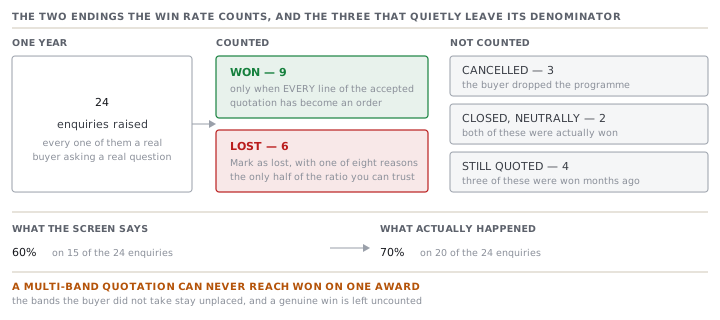
The workaround exists and it is not free. Raise a new revision, delete the lines the buyer did not take while it is still Draft, send it, have it accepted, and award its one remaining line. Every line is then placed and the RFQ closes Won. That is a second sign-off request and a second send for a deal already done.
The number on the list screen
Losing has its own button. Mark as lost opens a small red panel and asks for one of eight reasons: price, lead time, capacity or MOQ, quality, the buyer cancelling the programme, losing to a competitor, no response, or other. Only the last of the eight reveals a free-text box. It closes the RFQ as Lost and records the reason, and the panel says plainly what the reason is for. It feeds the win and lost rate.
That rate sits at the top of the Quotations list and reads, for example, Win rate 60% (9 won · 6 lost). The formula is one line: won divided by won plus lost, rounded to a whole number. Cancelled RFQs are not in it. Neutrally closed ones are not in it. Still-live ones are not in it. And when nothing is decided, the chip does not appear at all rather than showing a reassuring zero or a hundred.
Palesa reads Letsatsi's year off the list and then reads it again properly.
| Status on the screen | Count | In the win rate? | What really happened |
|---|---|---|---|
| Won | 9 | yes, as wins | won |
| Lost | 6 | yes, as losses | lost |
| Cancelled | 3 | no | the buyer dropped the programme |
| Closed | 2 | no | won, on multi-band quotes, closed by hand |
| Quoted | 4 | no | 3 of them won months ago, one genuinely live |
The screen says 60%, on 15 of the 24 enquiries. The truth is 14 won against 6 lost, which is 70%, on 20 of the 24. The gap is not a rounding artefact and it is not carelessness. It is the multi-band quotation, the thing this course spent two lessons recommending, falling straight through the one condition for Won.
Check yourselfYour win rate reads 40% and your general manager is unhappy. Before you defend anything, what are the three questions to ask of that number?Show the answer
First, what is the denominator? It is only the RFQs marked Won or Lost. Cancelled, neutrally closed and still-live enquiries are excluded, so the rate may be worked out on a minority of your year. Second, how many of your wins came off multi-band quotations? An RFQ reaches Won only when every line of the accepted quotation has been awarded, so a buyer taking one band of three leaves a genuine win permanently uncounted. Third, how many losses were recorded with Mark as lost rather than closed with the neutral button? A neutral close removes an enquiry from both halves of the ratio. Answer those and you will usually find the real rate is higher than the screen and the sample is smaller than anyone assumed.
Prompt · Rebuild my win rate from what actually happened
Before anybody quotes the figure on the quotations screen in a meeting.
Help me rebuild my quotation win rate from the outcomes rather than from the statuses, and show me the difference.

I will paste or describe my enquiries for a period. For each one: its number, the buyer, its status on the screen, how many lines its accepted quotation had if it had one, how many of those lines became orders, and what actually happened as far as I know.

First work out the rate the way the screen does: wins divided by wins plus losses, counting only the ones marked won and lost. Tell me how many of my enquiries that leaves out, and what proportion of the total that is.

Then work it out again from what really happened, counting an enquiry as won if any line of it became an order, and as lost if the buyer went elsewhere or declined. Show me both numbers side by side and the gap in percentage points.

Then explain the gap by cause, and put each excluded enquiry into exactly one bucket. A genuine win that could not be recorded because only some lines of a multi-line quotation were awarded. A win closed by hand with a neutral close. A loss closed by hand instead of being marked lost with a reason. A cancellation that belongs in neither half. And one still genuinely live.

Finish with the losses I did record, grouped by the reason given, and tell me which reason I should be least willing to believe. A reason chosen quickly from a list is not the same as a reason somebody asked the buyer about.
AI can make mistakes — check anything you act on.