Lessons · Lesson 2 of 5
Lines, bands and the buyer's target
What a style line stores, what a quantity band buys you later, how the comma in that field behaves, and why the feasibility badge on a banded line is the most cheerful answer available.
Lesson 2 of 5 · 24 min
A price is not a fact about a garment
The same jacket has several honest prices. It costs more each when you make a few, and less each when you make many. So a buyer's enquiry is never really one question. It is one question per quantity, and the app has a field for exactly that. This lesson is about filling it in. Get it wrong and you either quote a number you cannot make money at, or you refuse a price you could have offered.
Palesa has RFQ-1042 open and Dara's email in front of her. Sablewood wants two styles priced. The chore jacket is a repeat shape they may buy in three sizes of run. The vest is a single test buy. That difference is the whole of this lesson.
Every field name, hint, placeholder and verdict on this page was read out of the app's own source code. Where the screen in front of you disagrees with this page, the screen is right and the page is out of date.
The line, and the style it makes
The Style lines tab holds one row per style being quoted, and the form under it has five fields. The first is a find-or-create picker with an ➕ Add a new style… option. The hint under it says exactly what that shortcut does. It "Creates the style (in Development) and links it here — it appears in the Styles window, ready for its tech pack."
That is worth pausing on. Typing a name here does not scribble a label on the RFQ. It creates a real style record, in Development, that everybody in the building can now find. The panel offers the alternative above the form. If you are starting from the buyer's tech pack, go and create the style through Styles → New from tech pack first, then link it here.
A row whose style is a bare name and nothing more shows (name only) beside it. Those exist for historical reasons, and they cost you three things later. No feasibility estimate, no automatic cost pull from a bill of materials, and no spec freeze when the quote is sent. Prefer the picker.
| Field | Drover Chore Jacket | Ridgeline Canvas Vest |
|---|---|---|
| Style | STY-231, linked | STY-232, linked |
| Target quantity | blank | 6,000 pcs |
| Quantity bands | 1500, 4000, 9000 | blank |
| Buyer target price | 18.40 USD | 11.75 USD |
| Required delivery | 2027-07-24 | 2027-07-24 |
Target quantity and quantity bands are both optional. A line may carry either, both or neither. Only two rules are enforced: a target quantity must be more than zero if it is present, and so must a target price. A blank price stays blank. The field's own hint says so: "Left blank stays blank — never treated as zero."
What the comma in that field does
The bands field is plain text. Its placeholder is e.g. 1000, 3000, 5000 and its hint reads "Comma-separated price-break quantities. A cost sheet can be built per band." A price break is a quantity at which your price changes. The app splits the text on commas, trims each piece, drops anything that is not a positive number, removes duplicates, and sorts what is left from small to large.
Read that back and the trap is visible. The comma is the separator. So a comma inside a number is not a thousands mark. It is a second separator.
| Typed | Bands stored |
|---|---|
1500, 4000, 9000 | 1,500 · 4,000 · 9,000 |
1500,4000,9000 | 1,500 · 4,000 · 9,000 |
9000, 1500, 4000, 4000 | 1,500 · 4,000 · 9,000 |
1,500, 4,000, 9,000 | 1 · 4 · 9 · 500 |
The last row is not a refusal and it is not an error message. It is four bands, and the app then behaves perfectly correctly about them. The row displays all four, and the Cost sheets tab offers a Build a cost sheet button for each one, including a button for a run of one garment. Nothing is broken. The field simply took you at your word.
The rest of the app prints quantities with thousands separators, which is exactly the habit that produces the last row. Type digits and commas only, with no comma inside a number, and read the row back before you move on. The stored bands are displayed on the line, so a wrong one is visible in a second if you look.
Three bands, three prices, three sheets
Teboho builds a cost sheet per band. Four sheets exist by the end of the afternoon, three for the jacket and one for the vest. Each one stores its own ex-factory price, its FOB price and its margin. FOB is short for free on board. It is the price with the goods loaded on the ship at your port, so it includes inland carriage and export costs and nothing beyond that.
| Style | Quantity | Sheet FOB | Buyer target | Gap |
|---|---|---|---|---|
| Drover Chore Jacket | 1,500 | 21.86 | 18.40 | 3.46 over |
| Drover Chore Jacket | 4,000 | 19.42 | 18.40 | 1.02 over |
| Drover Chore Jacket | 9,000 | 18.05 | 18.40 | 0.35 under |
| Ridgeline Canvas Vest | 6,000 | 11.28 | 11.75 | 0.47 under |
The jacket's three prices span 3.81 a garment. The small run costs 21.11% more each than the large one. And the buyer's target of 18.40 is not something the jacket can or cannot meet. It is something the jacket meets at one of the three quantities and misses at the other two.
This is why the bands field matters more than it looks. If Palesa had typed a single target quantity of 1,500 and quoted from that, the honest answer to Sablewood would have been no. With three bands the honest answer is yes, at nine thousand, which is a conversation rather than a refusal.
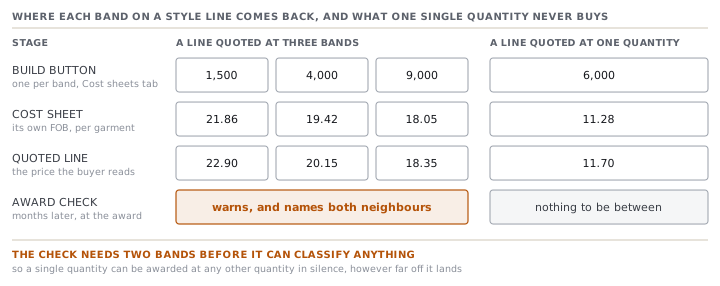
What a band buys you at the end
Bands are not only a pricing convenience. They are the only thing that switches on a particular check months later, when an accepted quote becomes an order.
At award the app compares the quantity actually being placed against the bands quoted for that same style line. Four outcomes exist, and three of them warn.
- Placed quantity matches a band exactly. Nothing is said, because the price was quoted at that quantity.
- Placed quantity falls between two bands. It warns, names both neighbouring bands, and says which band's price the order will carry.
- Placed quantity is below the lowest band. It warns harder, because a smaller run is normally dearer and the carried price is probably too cheap.
- Placed quantity is above the highest band. It warns softly, because a bigger run is normally cheaper and the risk is smaller.
None of the four blocks anything. They are named warnings that do not stop you, and a merchandiser may proceed.
Now the part that matters for how you fill the field in today. The check needs at least two bands to exist. With one band, or with none, nothing is classified and no warning is possible. The code says why in its own comment. With fewer than two bands there is nothing to be between, and the panel's "Quoted band was N pcs" hint already covers a differing quantity.
Read that against the two rows in the table above and the difference is stark. If Sablewood places six thousand jackets, the app will stop and say so. If Sablewood places four thousand five hundred vests, it will not, because the vest line offered a single quantity and there is nothing to fall between.
The badge that answers a question nobody asked
The last column on the line is headed Can we make it?, and it carries one of four verdicts: Can make it in green, Tight in amber, Too soon in red, or a dash when the answer is unknown. A line with no linked style says "Link a style to estimate", and a style with no schedule template says "No schedule yet — can't estimate".
Underneath the badge sits the soonest date you could ship and a link reading Why? Change it →. That link opens an explorer that runs in your browser, using the same engine as the real order plan. You can change the quantity and the proposed date and watch the verdict move.
Here is the thing to know about the collapsed badge. It is worked out for the line's target quantity, and the jacket line has none. What reaches the estimate in that case is zero.
That is not a rounding error. Two of the things that stretch the schedule only apply when the quantity is above zero. One widens the production window when the run needs more line-days than the template allows. The other adds line-days for a complex garment. At zero, neither applies. So the lead time is the template's bare minimum, and the verdict is the friendliest one the data can produce.
| Quantity used | Working days | Calendar days | Soonest ship | Slack to 24 July | Verdict |
|---|---|---|---|---|---|
| zero, as the badge reads it | 96 | 112 | 2027-05-31 | 54 days | Can make it |
| nine thousand, as Sablewood may buy | 136 | 159 | 2027-07-17 | 7 days | Tight |
Same line, same date, two answers forty-seven days apart. The green badge is not lying. It is answering the question it was given, which is how long this style takes when you make none of it.
Check yourselfA colleague quotes a repeat style at a single target quantity of 5,000 rather than as bands, on the grounds that the buyer always takes about five thousand. What has that decision cost, in the app rather than in principle?Show the answer
Three things, all of them later. There is only one cost sheet, so there is only one price and no honest answer if the buyer asks what four thousand or eight thousand would cost. There is only one quoted line, so a negotiation about volume has nothing to move to. And the between-band check at award is switched off, because it needs at least two bands before it can classify anything. So if the buyer places three thousand five hundred, the order silently carries the five-thousand price and nothing on the screen mentions it. Bands cost one extra field and buy a warning nine months later.
Prompt · Choose the quantity bands before I cost anything
After the styles are named and before the first cost sheet is built.
Help me choose the quantity bands to quote a style at, and make me justify each one.

I will tell you: the style and roughly what it is, the quantity or range the buyer has asked about, what this buyer has actually bought from us before if I know it, and any minimum order quantity our own materials impose.

Propose three bands and defend each one separately. For every band, tell me which real situation it exists for: the buyer's stated quantity, a smaller trial we would still accept, a larger run we would like to steer them towards, or a minimum below which we should not go. If a band has no situation behind it, say so and drop it.

Then make the case against my instinct. Ask me what happens if the buyer places a quantity that is not one of the three, and in particular a quantity that falls between two of them. Tell me which of my proposed bands the order would end up carrying the price of, and roughly how wrong that price would be in both directions. If the gap between two neighbouring bands is large enough that landing between them is expensive, say so and propose a fourth.

Two rules. Never propose a single band, and tell me plainly why: a single quantity switches off the between-band check at award, so a differing order quantity passes silently. And never round a band to a pretty number if the real constraint is a material minimum or a container fill. Give me the awkward number and the reason.
AI can make mistakes — check anything you act on.