Lessons · Lesson 1 of 5
The enquiry becomes a record
What an RFQ is in this app, which way it points, what the create drawer stores, and the two things an enquiry needs before the app will chase it for you.
Lesson 1 of 5 · 22 min
An enquiry is not yet a promise
A buyer writes and asks what a garment would cost. Nothing has been agreed. No price is fixed and no order exists. This lesson is about what the app does with that letter. It turns it into a record called an RFQ, which is short for request for quotation. Get this step wrong and the enquiry stays in somebody's inbox. Nobody chases it, and the buyer waits.
Letsatsi Apparel is a woven-outerwear factory on the Ha Thetsane industrial estate in Maseru, Lesotho. It makes chore jackets, work vests and canvas trousers, almost all of it for North American buyers. Four people appear in this course.
- Palesa Mokhethi is the merchandiser. The quotation desk is hers.
- Nthabiseng Lebona owns the business and is the only Owner in the workspace.
- Teboho Khoase builds the cost sheets.
- Dara Whitcomb buys outerwear for Sablewood Outfitters, a workwear label in the United States.
The enquiry we follow through all five lessons is RFQ-1042: two styles, a Drover Chore Jacket and a Ridgeline Canvas Vest, with a reply asked for by mid-February and delivery in late July.
Say the basis once. Every screen name, button label, field, message and rule on these pages was read out of the app's own source code, not out of a description of it. Where a claim depends on how your workspace is set up, the page says so and names the setting.
Which way round the enquiry points
The word quotation is used in both directions in this trade. Clear that up before anything else.
In MerchandiserOS, an RFQ is a buyer's enquiry to you. You are the supplier. The quotation you build in reply is the supplier quotation, because you are the supplier writing it. There is no record anywhere in the app for a quotation you receive from a fabric mill or a trim house. Prices from your own suppliers arrive as material prices and purchase-order lines. Those are somebody else's lesson.
The sidebar says the same thing in one line. Under the Quote heading sit two entries, Quotations and Cost sheets. The first is described as "Buyer requests for quotation (RFQs) — the styles being quoted, their cost sheets, and the quoted prices you reply with."
Two roles reach it. The Owner reaches everything, and the merchandiser has /quotations in her module list. Sourcing, planning, quality and the floor do not. Sourcing does hold /costing, the flat index of every cost sheet. Remember that when somebody says they cannot see a quote.
The drawer that makes the record
Palesa opens Quotations and clicks New RFQ. A drawer slides in from the side, and the list stays where it is behind it. Seven things can be entered. Only the buyer is yours to choose. The request date and the quoting currency arrive already filled in, and the other four may stay empty.
| Field | Required | What it does |
|---|---|---|
| Buyer | yes | Pick from the list, or add a new buyer by name |
| Request date | defaults to today | The factory's own date, not the server's |
| Response due | no | When the buyer needs the quote back |
| Incoterm | no | The full Incoterms 2020 set, and nothing else |
| Target market | no | Where the buyer sells the goods |
| Quoting currency | yes | Four codes the cost engine understands |
| Notes | no | Free text about the enquiry |
An incoterm is the delivery term the price is quoted on, such as FOB or CIF. It says who pays for carriage and where the goods stop being yours. The list here holds the eleven Incoterms 2020 terms and nothing else.
The buyer field is a find-or-create picker with an ➕ Add a new buyer… option. A first enquiry from a stranger never stops at a record that does not exist yet. What that new buyer record quietly carries is course 25.2's subject, and it is worth reading before you use the shortcut twice.
Only one rule is enforced across two of these fields. A response-due date earlier than the request date is refused with "The response-due date can't be before the request date." Everything else that is optional may stay empty, and an empty box stays empty. It does not become a zero or today's date.
The drawer tells you what will happen before you commit, in three numbered steps. It creates the request with a new RFQ number, opens its record so you can add the style lines, and starts it as a draft.
What Draft actually means
The record lands as RFQ-1042, and its status reads Draft. Seven statuses exist in the code, and these are the words on the chip.
| Status | Reads as | Colour |
|---|---|---|
| draft | Draft | grey |
| open | Open for quoting | amber |
| quoted | Quoted | green |
| closed | Closed | grey |
| closed_won | Won | green |
| closed_lost | Lost | red |
| cancelled | Cancelled | red |
The buttons you are offered depend on where the record already is, and there are fewer of them than the server would accept. On a Draft there are exactly two: Open for quoting and Cancel RFQ. Once it is open or quoted, three appear: Close RFQ, Mark as lost and Cancel RFQ. Once it is closed in any flavour, none appear, and a line of text says so instead.
Two of the seven can never be reached by a button at all.
- Quoted is set for you when a quotation on this RFQ is sent, or accepted, while the RFQ is still draft or open.
- Won is set for you when the last line of an accepted quotation is awarded to an order.
That is a deliberate shape. The two states that make a claim about the outcome are earned by an action somewhere else. They are not typed on a dropdown.
Two conditions before anything chases you
Here is the part that costs people quotes.
MerchandiserOS opens on My Work, and one of the things it puts there is a quote you owe. The rule that decides whether your enquiry appears is short enough to quote in full. The RFQ's status must be exactly open, and it must carry a response-due date. Miss either and the record is silent for ever.
| RFQ state | Response due | On My Work? |
|---|---|---|
| Draft | set | no |
| Draft | blank | no |
| Open for quoting | set, in the past | yes, red, under Fires |
| Open for quoting | set, within a week | yes, amber, under To do |
| Open for quoting | blank | no |
| Quoted | set | no |
Read the two silent rows in the middle of the table together and the failure is obvious. An enquiry left in Draft because the styles are not settled yet is exactly the enquiry most likely to be forgotten, and it is the one the app will never mention. The same goes for an enquiry with no date on it, because there is nothing to be late against.
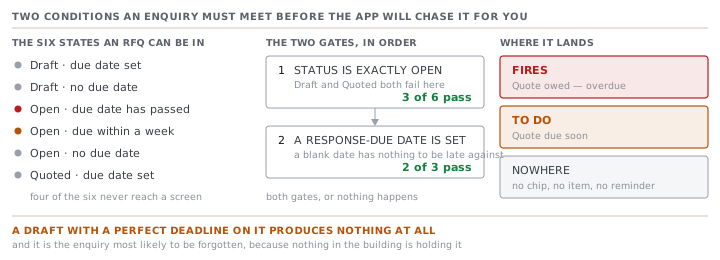
The wording, once it does fire, is specific. Overdue reads "Quote owed — overdue" and names the buyer, the date it was due and how many days ago. Approaching reads "Quote due soon". The window is a week. Both land you on the RFQ's Cost sheets tab, where the reply gets built, rather than on the record's front page.
Only the merchandiser and the Owner see these items. The list that decides which role sees which kind of alert puts quote chasing against the merchandiser alone, and the Owner sees everything by construction. Nobody in sourcing or planning will remind you.
Two different things called sending
The RFQ's header carries a button marked Send quotation, and it is not the one that sends the quotation.
It opens a message composer with the buyer already filled in, a subject of "Quotation — RFQ-1042" and a ready-made cover note addressed to Sablewood. It is an email or a WhatsApp message. It attaches no document and it changes no status. The drawer says plainly that "Email really sends when it's switched on; WhatsApp is logged for you to send yourself."
The step that makes a quotation Sent lives on the quotation itself, two screens deeper, behind four checks. That is lesson four. Confusing the two is easy, and the result is a buyer who has your covering letter and none of your prices.
What the record does not hold
Three things people expect to find on an RFQ and will not.
- No activity log. The context rail on the right shows cost sheets and quotes. The code that builds it says the section is left out rather than faked, because RFQs carry no activity log yet. Orders and styles do. This does not.
- No price. The RFQ holds the buyer's target price on each line and nothing of yours. Your number lives on a cost sheet.
- No commitment. Opening, quoting or closing an RFQ reserves no capacity, orders no material and creates no order. Every one of those needs an award, and an award needs an accepted quotation.
The record's front page reflects that. Six tabs sit under the header: Style lines, Costing, Cost sheets, Quotations, Messages and Overview. Five facts stay pinned above them: the number of styles, the request date, the response due date, the incoterm and the quoting currency. Everything else on this screen is a step towards a price you have not committed to yet.
Check yourselfYour buyer asked for a quote by Friday. You created the RFQ on Monday with the date in Response due, and left it in Draft while you waited for the tech pack. On Friday nothing had reminded you. Is that a bug?Show the answer
No, and it is the single most useful thing to know about this screen. The quote-chase rule needs the status to be exactly Open for quoting AND a response-due date to be present. A Draft with a perfect date on it meets half the rule and produces nothing. Neither does an Open RFQ with the date left blank. Open the record as soon as the styles are named and put the buyer's deadline in, and the app will raise it red on My Work the day it goes past. Leave it in Draft and the only reminder in the building is you.
Prompt · Turn a buyer's email into an RFQ I can actually open
The moment an enquiry arrives, before anybody starts costing it.
Help me turn a buyer's enquiry email into the fields an RFQ record needs, and tell me honestly which ones the email does not answer.

I will paste the email. Read it and produce two lists.

List one, the header. Buyer name. Request date. The date the buyer needs the quote back, quoted from the email if it is there. The trade term. The market the goods are being sold into. The currency the buyer is thinking in. Anything else about the enquiry worth a note. For each of these, either give me the value and the words in the email it came from, or write ABSENT and draft me the one-line question I should ask to get it.

List two, one entry per style being enquired about. The style, and whether it is one we already make or a new development. The quantity or quantities. Any target price and the currency it is in. The delivery date being asked for.

Then three rules. Do not guess a quantity from a phrase like a decent volume. Write ABSENT and quote the phrase. Do not convert a currency or a date format. And do not turn a range into a single number: if the buyer wrote somewhere between three and eight thousand, give me the range and tell me it needs to become separate quantity bands rather than an average.

Finish with the single most important thing the email does not say, and the sentence I should send back today to get it.
AI can make mistakes — check anything you act on.